








Your project on the Portal


Projects Categorization
From the administration interface, you have the possibility to create and organize your projects.
Click on the leaf "Projects" in the left Tree to display all created projects.
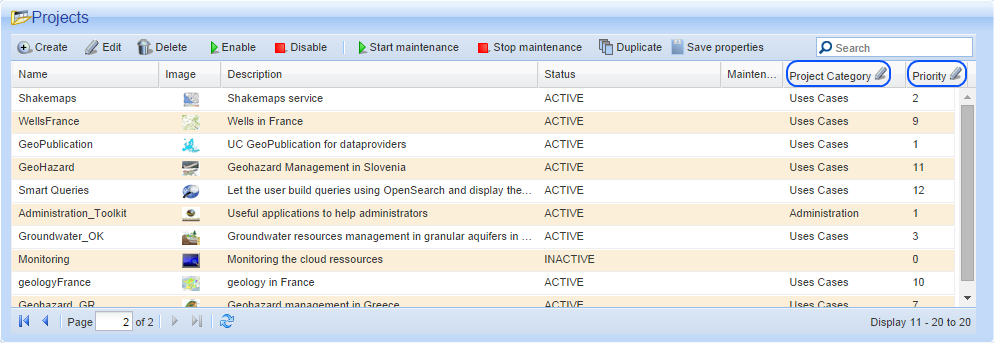
"Project Category" and "Priority" columns are editable so you can ordering projects as you want.
How does it work ?
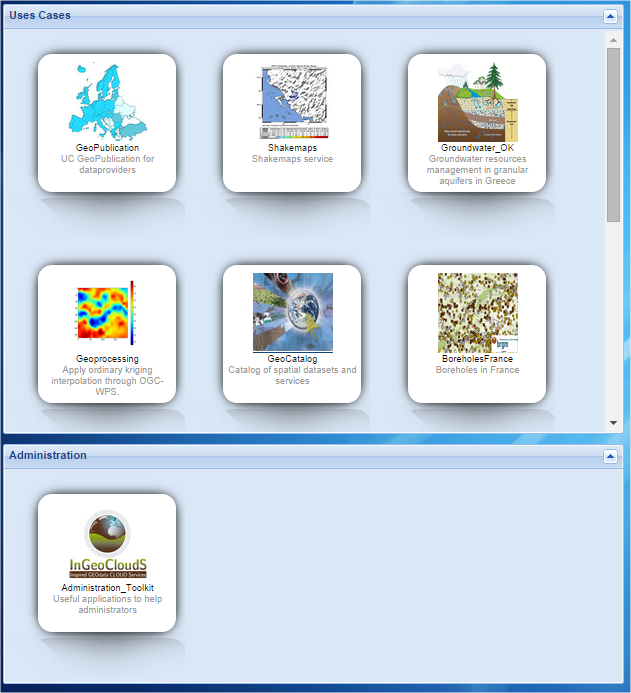
Projects which have the same category will be grouped together and displayed in the same panel. If a project has not category, it will be automatically placed in a "Public" category.
Priority manage in which order projects will be displayed (left to right).
Assuming you want to regroup two projects which treat the same topic :
- Double click on the cell corresponding to your project_1 under Project Category column to edit the category
-
Write the category

-
Do the same thing for the
priority

- Repeat the operation for you project_2 by copying/pasting the same category and changing the priority
The result will look like something like this :
- Log in to post comments
Last updates
Project's Calendar

Only for consortium members
Contact: you can contact the Consortium using the generic address: contact [@] ingeoclouds.eu. Thanks!
This project is partially funded by the European Commission CIP Program. This website reflects the views of the authors only, and the Commission cannot be held responsible for any use which may be made of the information contained therein.

InGeoCloudS Users Documentation and other documents of this Web
site by the InGeoCloudS consortium members
are licensed under a Creative Commons Attribution-NonCommercial-ShareAlike 3.0 Unported License.
Based on a work at http://www.ingeoclouds.eu/.
Ad banners and pictures are (c) AKKA Technologies